Portable equipment: schedule change for pickup/returns

Please note that the hours for pickup and return for portable equipment have been reduced to the following time slots:

Monday to Friday from 9:30-11 am, 1-2 pm and 4-4:30 pm.

All equipment from the Digital Imaging Lab is still be picked up on the 10th floor. An exception are the Canon 5D cameras, which are now at the Centre for Digital Arts (CDA) 5th floor depot. They can be picked up and returned during the following hours:

Monday to Friday: 11 am-12 pm, 2-4 pm and Monday to Thursday: 7:30 – 8:30 pm

When you make a reservation on PIR, you will see these slots in the timeline.


Posted by Scott on March 12th, 2015

“Paper Size Check” setting disabled in 11880 configuration

The “Paper Size Check” setting is now turned off in the Epson 11880 printer configuration in order to alleviate the paper loading problems. However, if you are printing with cut sheets, it is recommended to turn this setting back on before printing, and turn it off again when you are finished.

To reach this option, use the printer control panel to navigate to MENU > PRINTER SETUP > PAPER SIZE CHECK.

With this option disabled, the printer will also advance the paper an extra ~6″ on initial roll loads. This extra paper is not counted in the usage count, so users are not charged for the extra paper. After a print is made and cut, there will be no extra paper leader unless the roll is re-loaded.


Posted by Scott on February 16th, 2015

Epson 11880 presets and settings updated

The print presets for the Epson 11880 have been reorganized and updated.

All lab-made print profiles are now labeled as “Concordia FARF – Epson 11880 – Paper name.icc”.

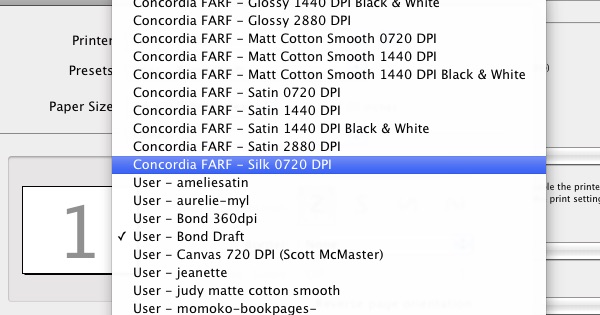
All lab-made print presets are now labeled as “Concordia FARF – Paper name Available DPI“. The various print settings for each paper have been updated for the current driver version.

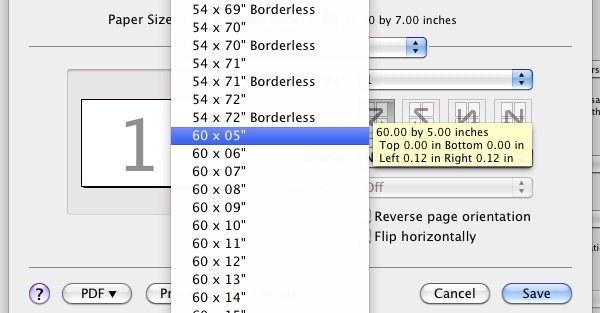
All custom print size presets have been cleaned up and reorganized, and new sizes added for 50″ rolls. New borderless presets have been added for the roll widths that support borderless printing. You will still need to select a borderless option for page source when printing borderlessly.


Posted by Scott on January 14th, 2015

Chromira printing available until December 15th

The Colex processor will run until December 15th, so that will be the last day of Chromira printing. It will re-open after the break, an update will be posted with the exact date.

Users planning to print between now and the 15th will be responsible for opening and closing the processor themselves.


Posted by Scott on December 8th, 2014

Recent Epson 11880 problems update

The 11880 printer has been experiencing an intermittent problem in the last several weeks related to page loading. It is sometimes difficult to get the printer to accept a properly loaded roll of paper, and large prints will often be aborted mid-print due to a “Page Load Error” or “Paper Sensor Error”.

A repair technician has been called in twice without results and I’ve spent several days taking the print head apart and cleaning sensors, troubleshooting different variables, reinstalling drivers, etc. Currently the problem is unsolved but I am waiting on new parts to test a possible solution.

The following tricks seem to bypass the problem:

  • Reloading the paper. Sometimes it will take several attempts to load a roll.
  • Not making a big print. Not ideal, but the problem seems to only effect large print sizes. The print abort happens at random points in the print, but almost always after about 3 feet of image.
  • Printing on a 60” roll. So far the problem is only happening on 44” sized rolls. All tests on 60” rolls have come out okay.
  • Printing with a large margin. Tests with a 3” sized margin on both sides of 44” rolls have all come out okay.

Please follow the workaround tips to avoid a cut-off print. Until the problem is resolved or a definite workaround is established, users will not be charged if they still experience a cut-off print due to this specific problem. In order to claim compensation users must do all of the following:

  1. Fill out the usage log as normal. I will deduct the amount of paper and ink from the total amount. Write an asterisk next to the entry with the problem.
  2. Leave a detailed entry in the troubleshooting logbook. Please record paper type and size, print settings (preset, page size, any modified settings from the preset), image layout (margins), file type and size. Please be as detailed as possible.
  3. Leave the effected print for me to see. Please leave it on the table in front of the window, with your name and date on it.
  4. Send me an email (scott.chandler@concordia.ca) notifying me that you experienced this problem.
  5. Sorry for the inconveniences this problem has caused, hopefully it will be resolved soon.


Posted by Scott on October 15th, 2014

Recent Epson 11880 problems

The 11880 has been experiencing some problems due to the paper size sensor. This is causing the printer to believe paper is loaded incorrectly, sometimes while printing, resulting in an aborted print. The problem is intermittent but seems to be happening primarily on large prints. A repair technician has worked on the machine but the issue is unresolved, he will return next week to try again. In the meantime, please use at your own risk.

If you do use the printer and experience these problems, please log it in the troubleshooting book with as much detail as possible. Please record the paper type and size, information on your print file such as dimensions, file size and type, and whatever print settings you were using.

An update will be posted when the issue is resolved.


Posted by Scott on October 1st, 2014